
SnapLine guide
Connect ESPN Fantasy
Use the ESPN session already signed in to your Chrome profile.
Sign in to ESPN
Sign in to the ESPN fantasy website in the same Chrome profile where SnapLine is installed. Confirm you can open the league there.
Connect the session
Open Providers → ESPN Fantasy and click Connect ESPN. SnapLine uses that signed-in browser session to discover available leagues.
Review imported leagues
Open the imported league from the provider page or Leagues. Turn on Show in ticker and select the matchups you want.
What appears
Scores, records, remaining-player counts, roster highlights and available projections. Win probabilities may come from ESPN or be calculated from available projection data; calculated probabilities are estimates.
A league is missing
Confirm the league is accessible on ESPN, then reconnect to retry discovery. If it is still absent, report the issue without sending your session cookies.
Troubleshoot provider discovery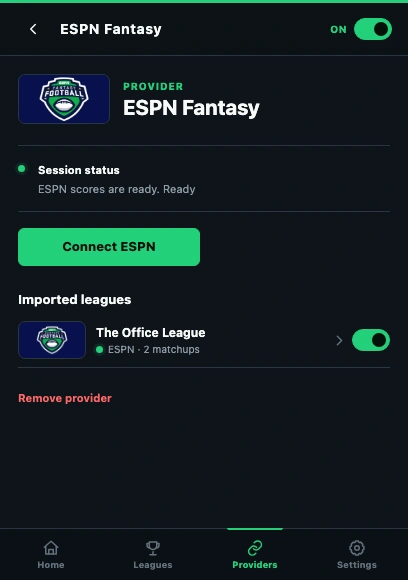
- Read the connection status before reconnecting.
- Use the provider’s Connect action in this Chrome profile.
- Open an imported league to check its settings.
These guides describe SnapLine 1.1.1. Older versions may have different controls; find your version at the bottom of Settings.