
SnapLine guide
The ticker is missing
Separate disabled sources and site restrictions from a player-detection problem.
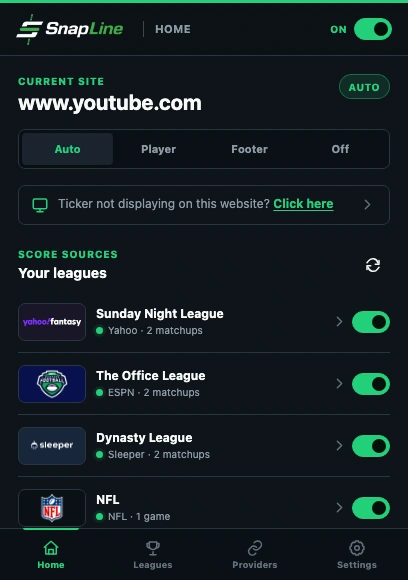
- The master switch must read On.
- Current site mode determines whether SnapLine uses a player or footer.
- Refresh scores after checking your enabled sources.
Check the page and master switch
Open a normal HTTP or HTTPS page in Chrome and turn SnapLine On. Chrome’s internal pages and the Chrome Web Store do not allow content-script overlays. Native Picture-in-Picture displays only the video, so SnapLine stays on the webpage rather than appearing inside the PiP window. Reload a page that was already open when you installed or updated the extension.
Check website scope
Open Settings. If Selected websites is active, add the current domain or choose Add current website. Check that the current-site mode is not Off.
Make sure there is something to show
Open Leagues. Enable at least one league, then open its settings and confirm Show in ticker. A restrictive Selected teams filter can leave no eligible matchup.
Try the footer to isolate detection
On Home, choose Footer for the current site. If the ticker appears, your source data and website scope work; continue with the player attachment guide. If it is still absent, check Chrome’s extension site-access setting and confirm SnapLine may run on this website.
If it still happens
If only the player overlay is missing, follow player attachment. Include whether Footer worked in your report. Collect the right information and send a report →
These guides describe SnapLine 1.1.1. Older versions may have different controls; find your version at the bottom of Settings.