
SnapLine guide
Missing league, matchup or team
Check account discovery, league enablement and matchup filters before reconnecting.
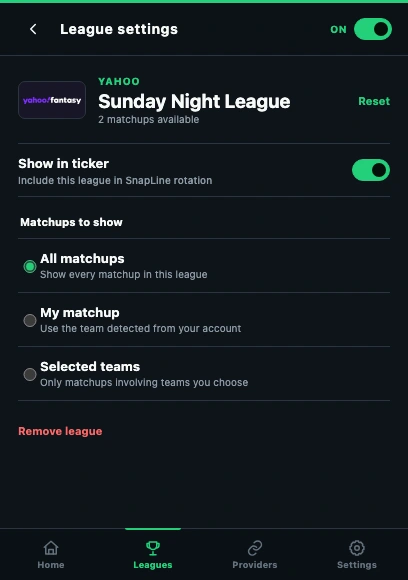
- Show in ticker controls whether this league is included.
- A matchup filter can hide games even when the league is enabled.
Confirm which account owns the league
Check the league on the provider’s own website. Reconnect Yahoo with the correct account, use the signed-in ESPN profile, or correct the Sleeper username if it does not appear among imported leagues.
Enable the league in SnapLine
Open Leagues, then the league’s settings. Turn on Show in ticker. Disabling a league in SnapLine does not delete it from the fantasy provider.
Broaden the matchup filter
Select All matchups temporarily. My matchup depends on available account/team identification; Selected teams includes only the teams you chose. Confirm the selected team belongs to this league.
Separate NFL from fantasy
The NFL Scoreboard is a separate source and needs its own enablement. It shows real NFL games rather than your fantasy league. Refresh scores after correcting filters; availability still depends on the provider’s current league/week data.
If it still happens
Report the provider, which filter you selected, and whether the matchup appears on the provider website. Avoid sharing credentials. Collect the right information and send a report →
These guides describe SnapLine 1.1.1. Older versions may have different controls; find your version at the bottom of Settings.