
SnapLine guide
Connect Yahoo Fantasy
Authorize read-only access to the Yahoo account that owns your fantasy leagues.
Open Yahoo Fantasy
In Providers, choose Yahoo Fantasy and click Connect Yahoo.
Authorize with Yahoo
Complete Yahoo’s sign-in and OAuth authorization window. SnapLine needs read-only access to your fantasy leagues and matchups. Return to the popup when authorization completes.
Choose imported leagues
The provider page lists imported leagues. Open one to reach its League settings, enable Show in ticker and choose your matchups.
What appears
Matchup scores, team records, rosters and player highlights. Projections and win probability appear when supplied. Player game context appears when a corresponding NFL game is available.
Refresh or reconnect
Use Refresh scores on Home to request a data update. If authorization fails or access was revoked, return to Yahoo Fantasy and use Connect Yahoo. Check the account in the authorization window if a league is missing.
Choose leagues and matchups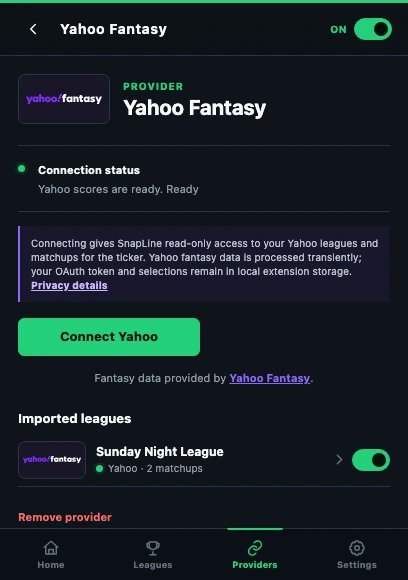
- Read the connection status before reconnecting.
- Use the provider’s Connect action in this Chrome profile.
- Open an imported league to check its settings.
These guides describe SnapLine 1.1.1. Older versions may have different controls; find your version at the bottom of Settings.