
SnapLine guide
Missing projections, players or probability
Understand feed limitations and the Detailed/Simple setting without chasing nonexistent fields.
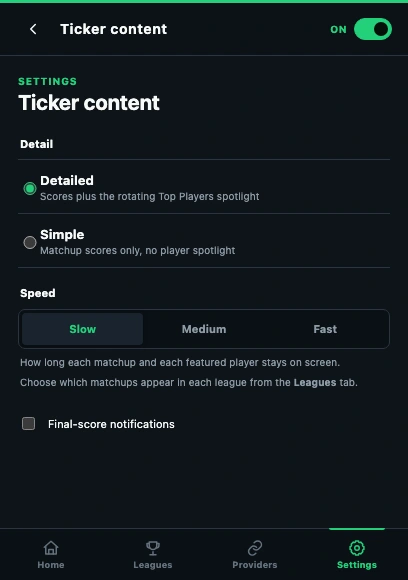
- Detailed includes the player spotlight; Simple intentionally omits it.
- Speed changes rotation timing, not which data the provider supplies.
Check Detail first
Open Settings → Ticker content. Choose Detailed if you want the Top Players spotlight. Simple intentionally keeps the ticker to matchup scores. Let the current matchup complete its normal reveal before judging whether a panel is absent.
Check what the provider supports
Scores, projections and probability are different fields. Yahoo and ESPN can expose additional matchup data; ESPN probability may be a labeled estimate when available. Sleeper does not supply a win-probability rail. Missing source fields are omitted rather than invented.
Separate upcoming games from live performers
An upcoming NFL game can show kickoff information and supplied news. Live/final games can show available performers. No live player statistics exist before the game supplies them, and player game context requires a corresponding NFL game.
Refresh only when the feed should contain it
Compare the provider website and refresh once. If the official view also lacks the field, changing height or reconnecting cannot create it. If a supported field is consistently present there but absent in SnapLine, record that specific example.
If it still happens
Report the provider, game state, missing field and Detail setting, with screenshots of the relevant provider and ticker views. Collect the right information and send a report →
These guides describe SnapLine 1.1.1. Older versions may have different controls; find your version at the bottom of Settings.