
SnapLine guide
Send a useful bug report
Capture the symptom, reproduction steps and consented context without exposing credentials.
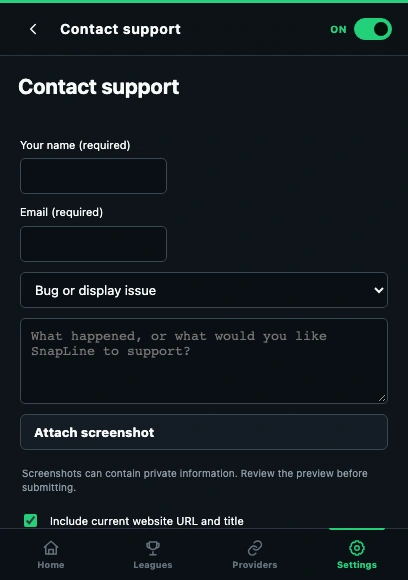
- Describe what happened and the steps that reproduce it.
- Review optional website context and screenshot choices before submitting.
Write a reproducible example
Open Settings → Report a bug or request a feature. Describe the website/provider, expected behavior, actual behavior and shortest steps to reproduce it. Include which troubleshooting checks you tried and what each changed.
Attach the right view
For display issues, show the entire player and ticker plus relevant Appearance settings. For score issues, compare the same matchup and field. Remove private tabs, account details or unrelated information from screenshots before selecting the file.
Choose context deliberately
The extension can include explicitly selected website context, sanitized HTML and a screenshot. Review those choices before submitting. Never include tokens, cookies or passwords. Enter name and email if you want to submit through the support API.
Confirm receipt or use the fallback
A submitted report returns a reference id. Keep it for follow-up. If submission fails, your input stays available; retry later or use Copy/download and email support@snaplinefantasy.com. Preparing or copying a report does not send it.
If it still happens
If a screenshot upload fails, try a smaller file in the supported format shown by the form, or submit the description first and mention the attachment problem. Collect the right information and send a report →
These guides describe SnapLine 1.1.1. Older versions may have different controls; find your version at the bottom of Settings.